
Nutrition prescriptions
calculated to the milligram.
MyTotalMix is parenteral nutrition (TPN) compounding software for hospital pharmacy. Plan, calculate, and order PN admixtures for adults, older children, infants, and neonates.
Everything a hospital pharmacy needs for parenteral nutrition
Prescriptions, PN compounding, ingredient dictionaries, hospital structure, user accounts. One portal, aligned with ward procedures.
Cybersecurity
Encrypted sign-in and storage of medical data. Only authorized roles reach prescriptions and patient data.
Prescription issuing
The physician enters doses, the system calculates requirements against ESPGHAN limits. Separate forms for neonates, children, and adults. Errors surface before the prescription is sent.
Mixture (admixture) compounding
3-in-1, 2-in-1, and multi-chamber bags. A ward template or an individual formula, each with automatic calculation and an osmolarity check.
Process automation
The compounder loads an order after scanning the label barcode. Labels and reports print on thermal printers, plus PDF export. HIS integration is possible over an API, arranged individually during rollout.
Organizational structure
Hospital, wards, and cost centers in one tree. Assign users to units, and permissions flow down the hierarchy.
User management
Roles for physician, pharmacist, and technician, plus permission groups inherited across the structure. Enter an email and sign-in routes to the right identity provider.
Different limits for an adult, different for a preterm infant.
Neonates and younger children follow a different path than adults and older children. Separate forms, separate limits, ESPGHAN validations, all configurable per organization.
Individual prescriptions and ward templates.
Complete, partial, and immunomodulating. Set dose limits per organization. Support for oncology and long-term therapy.
- An individual formula or a ready ward template
- Three types: complete, partial, immuno
- Doses and osmolarity checked as you go
Safe doses for the smallest patients.
A separate form with tighter ESPGHAN limits. Gestational age, birth weight, day of life, and daily requirement all count. For preterm infants that matters.
- g/kg/day limits per ESPGHAN, editable per organization
- Preterm and full-term neonates
- An exceeded limit shows immediately
From the physician's prescription to a finished bag
The flow is deterministic. Validations and a full audit trail at every step.
- 01
Physician writes the prescription
- 02
Pharmacist verifies and accepts
- 03
Pharmacist creates the bags
- 04
Compounder and label
What the physician does, what the pharmacist does
The same PN prescription looks different from each role's perspective. Here's the exact step-by-step workflow, as it runs in MyTotalMix.
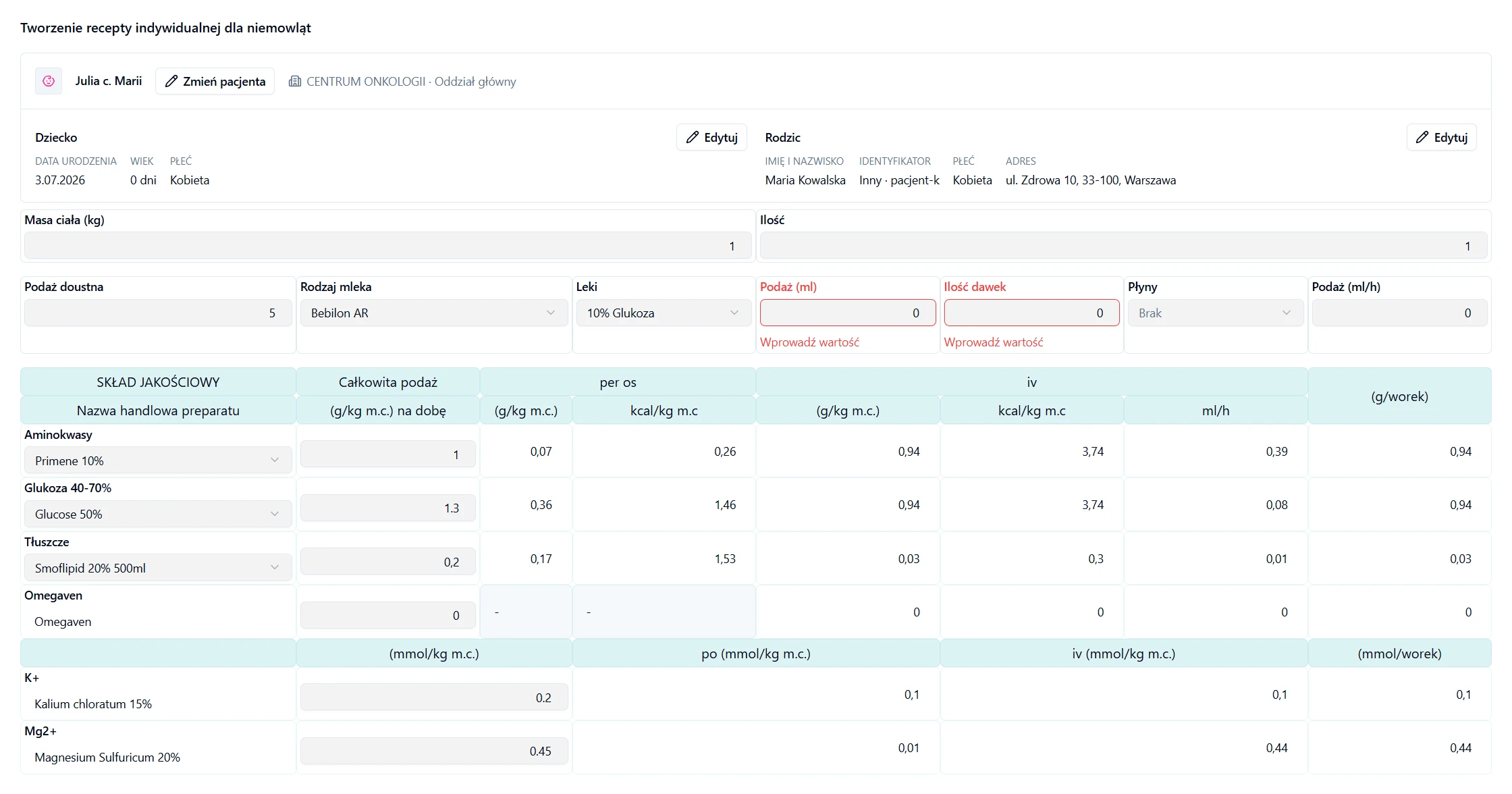
Physician
Writes the prescription
Picks the dosing path: adult and older child, or neonate and younger child. Fills in doses and ingredients for a patient selected from the ward's list.
Sees validation right away
The system calculates the requirement and compares it against ESPGHAN limits (g/kg/day) and checks osmolarity. Any limit breach is visible before the prescription reaches the pharmacy.
Corrects and versions
If the pharmacist sends the prescription back with notes, the physician corrects the doses. Every change is saved as a new version: V1 → V2 → V3, signed and timestamped.
Hands off to the pharmacy
The approved prescription goes to the pharmacist for verification, with no manual handoff of documents between the ward and the pharmacy.
Confidence that doses stay within ESPGHAN limits, without manual calculations or handwritten notes.
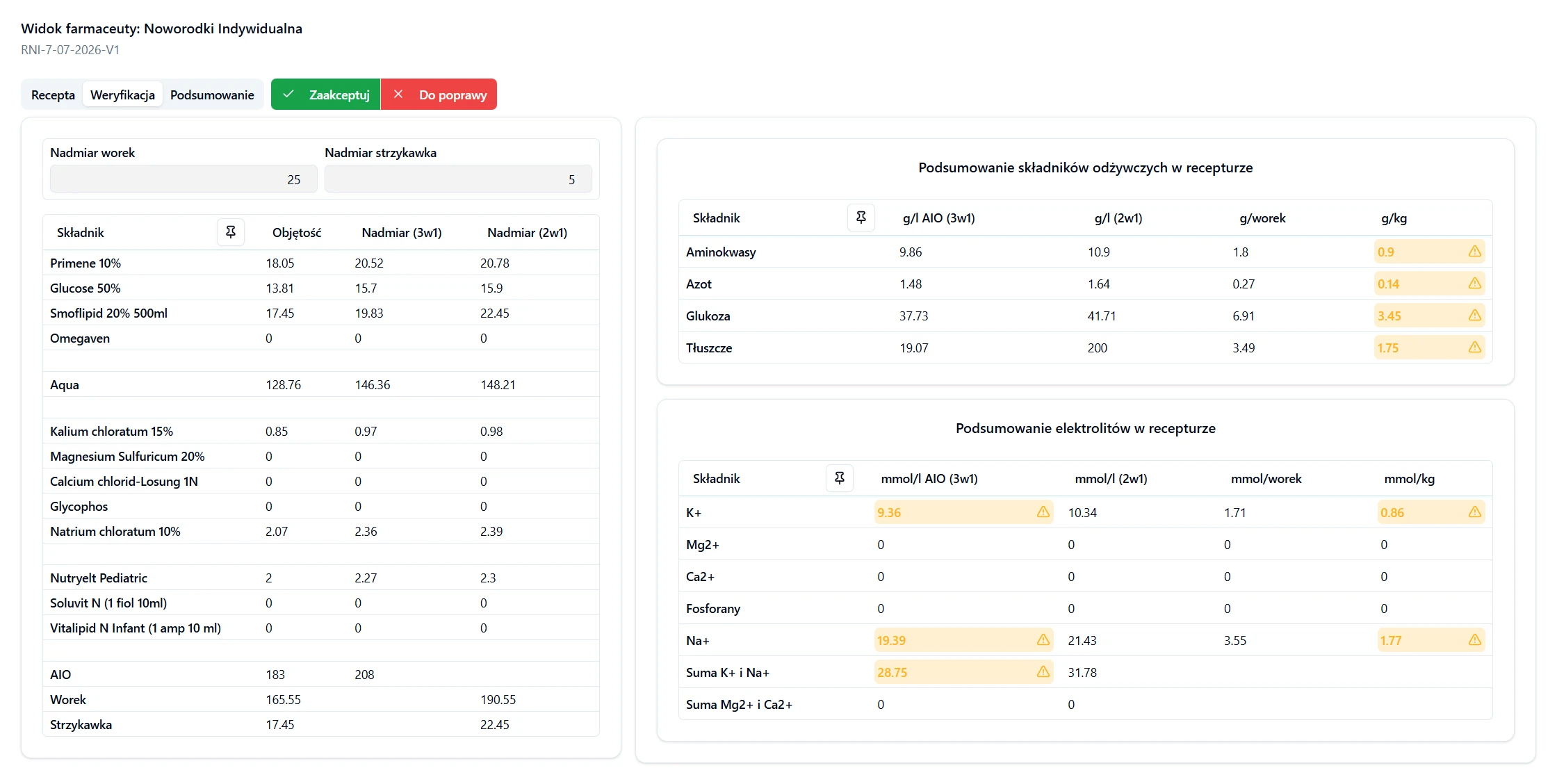
Pharmacist
Verifies the prescription
Three tabs: prescription, verification, summary. Patient data, doses, and mixture composition are all visible in one place.
Checks compliance with guidelines
The system flags exceeded dose limits per ESPGHAN and ward settings, osmolarity, and ingredient incompatibilities.
Approves or sends it back with notes
Accepts the prescription, rejects it, or asks the physician for a correction. Every decision and every new prescription version (V1 → V2 → V3) is saved, signed, and timestamped.
Prepares data for the compounder
An approved prescription turns into 3-in-1 or 2-in-1 bags. The compounder loads the order by scanning the barcode on the label, with no manual retyping of the composition.
Full control over every prescription and a complete audit trail: who approved what, and when.
The application does not replace a physician.
It is a tool in the hands of a medical professional. It supports planning, calculating, and ordering parenteral nutrition mixtures, but it does not replace a physician, does not decide for them, does not provide healthcare services on their behalf, and does not assess health status on its own.
Frequently asked questions
Short answers to the questions we hear most often from clinical pharmacists, neonatologists, pediatricians, and hospital IT teams. Anything missing? Get in touch
What is MyTotalMix?
MyTotalMix walks a hospital pharmacy through the whole process of preparing a parenteral nutrition (PN/TPN) admixture, in four steps, from the physician's prescription to a finished bag.
A physician writes the prescription for a neonate, child, or adult, picking the ward and a patient from the list. A pharmacist checks it across three tabs: prescription, verification, summary. Exceeded dose limits, validated against ESPGHAN, are highlighted right away. Once accepted, the order becomes 3-in-1 or 2-in-1 bags. Labels and reports print on thermal printers, and the compounder loads the order after scanning the barcode on the label, with no retyping. Each label shows the composition, expiry date, and batch number. The report goes straight into the patient's record.
Who is MyTotalMix for?
It is built for clinical pharmacists and hospital pharmacy managers, and for the physicians who order parenteral nutrition: neonatologists, pediatricians, intensivists, and oncologists who decide on macro- and micronutrient dosing every day.
It pays off most in large multi-specialty hospitals, oncology centers, and pediatric and neonatal units. Those places prepare a dozen to several dozen individual PN admixtures a day, and recalculating g/kg/day doses against ESPGHAN by hand gets slow and risky. With automatic validations and limits set per organization, the team handles more orders without more risk of error, while staying inside ward procedures and audit requirements. Hospital IT teams live in it too, keeping the organizational structure, integrations, and user accounts in order. As a side effect, mixture naming lines up across wards, so physicians and pharmacists spend less time clarifying what was meant.
How does MyTotalMix improve patient safety?
Patient safety rests on three things: automatic requirement calculation, ESPGHAN-based validations, and a full audit trail on every change to a prescription.
Dose limits (g/kg/day) for energy, protein, fat, carbohydrates, and electrolytes, set per organization and per patient type, are compared against what was entered in the formula. Any overflow lights up in the pharmacist's verification tab before the order reaches production. Osmolarity and ingredient compatibility get checked too. The compounder pulls data straight from the system after a barcode scan, so nobody retypes values by hand. Every prescription version (V1, V2, V3) is signed and timestamped, so you can reconstruct the history of clinical decisions during a review or a safety incident. The protein limit for a preterm infant differs from a full-term one, and the system picks the right threshold itself, from the patient's data.
How do audit and change tracking work?
Nothing is deleted. Every record is archived instead, so the pharmacy keeps a complete, tamper-evident history.
Each formula keeps a version history, say V1 → V2 → V3, and every change carries a signature and a timestamp: who and when. The same goes for accounts, permission groups, and organizational units. Only authorized users can open the archive, and every read is logged. Database backups run on a regular cycle.
What systems does it integrate with?
MyTotalMix connects to thermal printers for labels and reports and to the compounder over barcode. The system runs fully standalone. You always enter the order directly in MyTotalMix, with no dependency on other systems.
The compounder scans the barcode on the bag label and loads the whole order itself, so the production operator never retypes the composition. Thermal printers connect through printing services authenticated with OAuth, and you set access at the ward or central-pharmacy level. Master data, meaning modified milks, ready-made mixtures, and single ingredients, moves through CSV files. Import and export make rollout migration and catalog updates easier. Integration with the hospital HIS is possible over an API. Scope and approach are worked out individually as part of the rollout. You configure all of it from the admin panel.
How does access control work?
Access follows a users → groups → permissions model. A group gets precise permissions (create, read, update, delete) for each function separately: issuing prescriptions, approving bags, managing dictionaries.
Permissions are inherited down the hierarchy: from the whole hospital, through wards, to cost centers. An admin sets access once, at the top, and lower units inherit it, with the option to narrow it for a given ward. Sign-in recognizes the organization from the email domain and routes the user to the right identity provider, with no picking a hospital from a list. Revoke a permission on a group and it hits everyone who inherits it at once. The whole structure shows up in the panel as an org tree.
How long has MyTotalMix been in development?
We have been developing MyTotalMix for 15 years, building the system on experience gathered around parenteral nutrition in hospital pharmacies. The current version is a full rewrite of the codebase on a modern stack: the same domain scope and the same clinical rules, without the weight of older technology choices.
The foundation, meaning the prescription → verification → compounder cycle, ESPGHAN dose limits, and a full audit trail, rests on what we learned over those years working with clinical pharmacists, neonatologists, and pediatricians.
Let's deploy MyTotalMix in your hospital pharmacy.
A 15-minute demo. We show how to issue a prescription, compound a bag, and print a label.