
Production - Bags
Section Purpose:
This documentation describes the bag list - production orders created on the basis of prescriptions. It contains information about reviewing bag details, printing labels and recreating bags in case of errors.
Basic Information
Section titled “Basic Information”The bag list displays all production orders in the system that have been accepted by a pharmacist in the pharmacist view. Each bag is associated with a specific prescription and contains detailed information regarding the preparation of the mixture.
Each bag has the following properties:
Example for the prescription number RNI-23-01-2026-V1
-
Bag number - a unique identifier of the bag in the system.
- Prescription number (4 digits) - extracted from the prescription number =>
0023 - Month (2 digits) - the month the prescription was created =>
01 - Short year (2 digits) - the last two digits of the year =>
26 - Version (1 digit) - the prescription version =>
1 - Suffix (optional) - specifies the bag type:
B- “2-in-1” bag (BAG)S- syringe (SYRINGE)- no suffix for a “3-in-1” bag
- Sequential number (4 digits, after the hyphen) - the ordinal number of the bag for the given prescription (0001-9999)
for the prescription
RNI-23-01-2026-V1, the first “3-in-1” bag will have the number002301261-0001, - Prescription number (4 digits) - extracted from the prescription number =>
-
Prescription number Identifier - the number of the prescription on the basis of which the bag was created.
-
OPK - the OPK code of the department in which the prescription was issued.
-
Patient - the patient for whom the mixture is being prepared.
-
Bag type - 3-in-1, 2-in-1 or Syringe. “2-in-1” (possible only for RNI prescriptions) additionally creates a separate “Syringe” item.
-
Preparation date - when the bag is to be prepared.
-
Expiry date - until when the bag is valid.
-
Volume overfill - the volume overfill planned for the bag.
-
Status - the current status of the bag (see status table).
-
Delivery route - the assigned delivery route (for home prescriptions).
-
Note
-
Label - the printed label with the bag details and a barcode.
Bag list
Section titled “Bag list”The bag list works similarly to the prescription list - it displays a table with all production orders.
View of the bag list in the application
Section titled “View of the bag list in the application”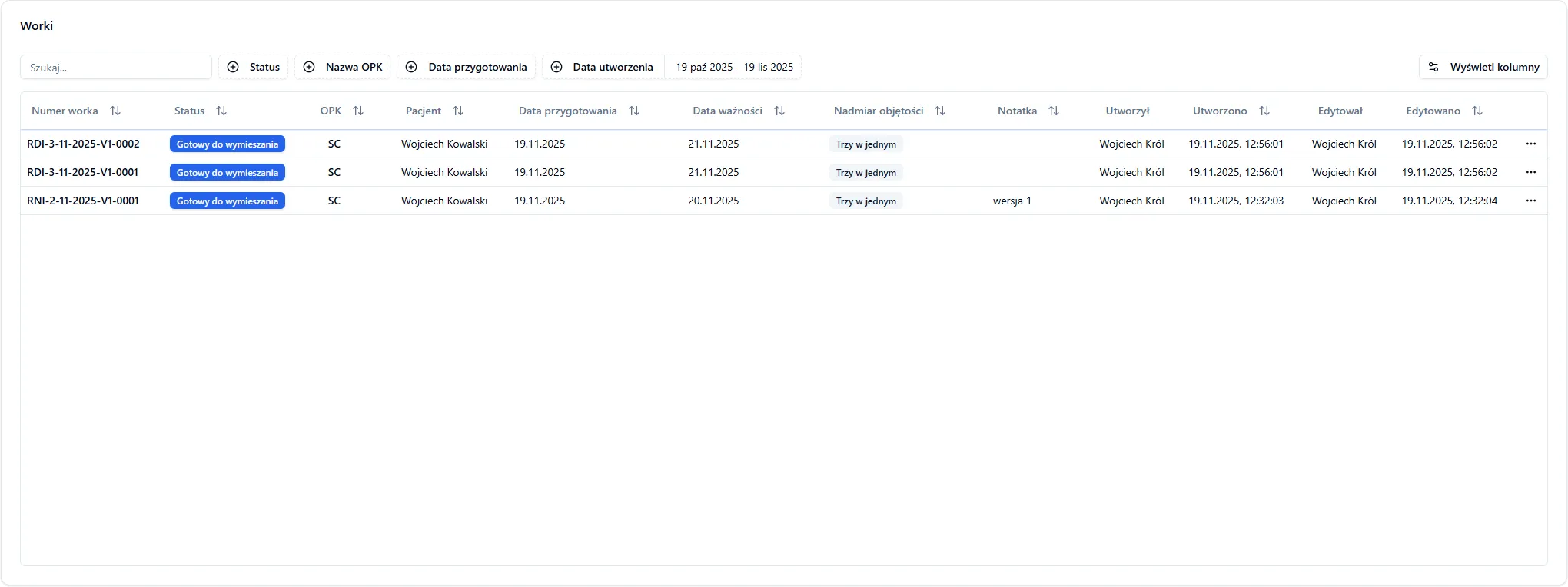
Actions available for a bag
Section titled “Actions available for a bag”Depending on the bag status, various operations are available:
- Details - bag details and the label appearance (always available).
- Reprint label - reprints the label. Hidden for statuses: Transmission error, Cancelled, Creation error, Applied.
- Retry bag creation - available only for the “Transmission error” status. Allows going through the bag creation process again without re-accepting the prescription.
- Confirm mixing - for the “Mixing in progress” status; changes the status to “Created”.
- Confirm administration - for the “Created” status; changes the status to “Applied”.
- Confirm destruction - for the “Created” status; changes the status to “Destroyed”.
- Cancel - for statuses: Mixing in progress, Pending, Transmission error, Ready to mix.
- Change status - available only for the superadmin.
Bag statuses
Section titled “Bag statuses”Each bag goes through successive states in the creation and fulfillment process:
| Status | Description |
|---|---|
| Pending | The bag has just been created and is waiting to be sent to the server |
| Ready to mix | The bag has arrived at the server and is ready to be mixed |
| Mixing in progress | The bag has been scanned on the mixer and the file extension has changed |
| Created | The bag has been successfully created and the file extension has changed |
| Applied | The bag has been delivered to the patient |
| Creation error | An error occurred during the creation (mixing) of the bag |
| Cancelled | The bag has been cancelled (e.g. at the request of the patient or doctor) |
| Destroyed | The bag has been destroyed (physically) |
| Transmission error | An error while transmitting data or printing the label - the bag can be recreated |
Frequently Asked Questions
Section titled “Frequently Asked Questions”Can I edit a bag after it has been created?
No - the bag parameters (type, date, validity, quantity) cannot be edited after creation. When sending the bag ends with an error (status “Transmission error”), you can use the “Retry bag creation” function.
What happens if the printer is not available?
If the printer is not available, you can select a different printing service or try again later. The bag will remain in the system and printing can be retried using the “Reprint label” button.
Can I create multiple bags for a single prescription?
Yes - in the pharmacist view you can add multiple bags for the same prescription. Each bag will have its own number and label. After accepting the prescription, you can add further bags without going through the acceptance process again.
What is the difference between “Reprint label” and “Retry bag creation”?
- Reprint label - to be used when the bag has already been correctly created and you only need a new label printout.
- Retry bag creation - to be used for the “Transmission error” status, when sending the bag failed.