
Delivery routes
Section Purpose:
This documentation describes what delivery routes are, what properties they have, and how to manage their list in the system. Delivery routes are used in the pharmacist view for prescriptions with home treatment (treatment type “Home”).
Basic Information
Section titled “Basic Information”Each delivery route has the following property:
- Name - the name of the delivery route (e.g. “City Center”, “Northern District”, “Route A”)
Delivery routes are used in the pharmacist view during prescription verification. Only pharmacists have access to selecting a delivery route.
When is a delivery route available?
Section titled “When is a delivery route available?”The delivery route selection dropdown appears in the pharmacist view only when:
- the prescription concerns an adult patient, and
- the “Home” treatment type is selected in the patient data section of the prescription
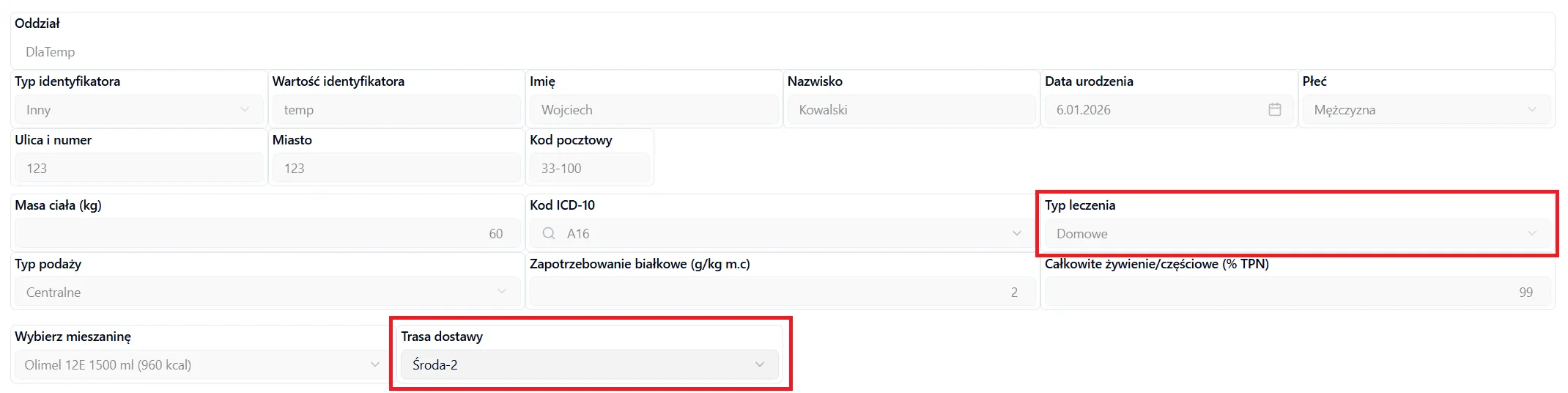
What happens to the selected route?
Section titled “What happens to the selected route?”The selected delivery route is assigned to the prescription and is then visible on the label printed for the bag. This allows production and delivery staff to easily identify which route the formula should be delivered by.
Managing Delivery Routes
Section titled “Managing Delivery Routes”In the delivery routes view you can:
- Add a new route - click the “Add Delivery Route” button and provide the route name
- Edit a route - you can change the name of an existing route
- Archive a route - routes that are no longer used can be archived
- Search routes - use the search field to quickly find a specific route
Frequently Asked Questions
Section titled “Frequently Asked Questions”Who can add and edit delivery routes?
Only users with the appropriate permissions (e.g. administrator or pharmacist) can manage delivery routes.
Can I delete or edit a delivery route?
Yes, you can edit the route name or archive a route that is no longer used. However, keep in mind that the route is saved as a snapshot at the moment the bag is created. This means that if you later edit or delete the route, the label on the bag will still show the route name from the moment it was created. The new or changed route name will only be available for newly created bags.
What happens if I do not select a delivery route for a home prescription?
Selecting a delivery route is required for prescriptions with the home treatment type. Without selecting a route, it will not be possible to continue the bag acceptance process.
Are delivery routes visible to physicians?
No, delivery routes are visible and accessible only to pharmacists in the pharmacist view. Physicians do not have access to this field.